Search This Blog

Showing posts with label Application Note. Show all posts

Thursday, February 11, 2016

Dranetz Instruments Revenue Accurate vs. Revenue Certified/Grade

www.dranetz.com


INTRODUCTION


Most Dranetz Power Quality products can also compute and measure common energy parameters, such as W, VA, VAR, PF, Demand, Energy, and more. The ability to measure energy in addition to PQ opens the doors to many more applications, including energy only applications that can include electrical consumption.

When measuring electrical consumption for billing, revenue, meter verification, reference, or other purposes, high accuracy is often required. When the metered data is to be used for billing purposes, a revenue certified/grade meter may be required by code or law. When a revenue certified meter is not required, a revenue accurate meter may meet the needs of the application. Such a meter has similar accuracies as a revenue certified meter, but without the laboratory testing and the certification itself.

This White Paper summarizes the most common standards used for revenue certified energy metering and how the accuracies and capabilities of current Dranetz products compare to these standards. 

You can download the complete Dranetz white paper here.

Tuesday, July 7, 2015

Dranetz HDPQ® 3G/4G Cellular Wireless Applications

www.dranetz.com

INTRODUCTION 
Dranetz HDPQ Power Quality, Demand & Energy instruments have state-of-the-art communications capabilities that allow for full remote control of the instrument and data downloading from any location with connectivity to the instrument. The Dranetz HDPQ instruments offer standard VNC communications for remote control and the free Dranetz App is also available for Apple and Android devices. 

These remote capabilities greatly enhance the user’s safety and productivity. Dranetz HDPQ instruments can easily connect to any Ethernet and Wi-Fi (model dependent) network, but what can you do if there isn’t a network available? 

Cellular wireless data networks are a great way to overcome this situation. This application note describes how to use the Dranetz HDPQ instrument with a typical cellular wireless router. 

3G/4G CELLULAR MODEM APPLICATION 
Cellular modems use the same data networks as Smartphones, but are dedicated to data communications. Cellular wireless modems can be purchased from a cellular carrier or 3rd party sellers, and like any smartphone, they require a contract or data plan. Note that the cellular modem and data plan/contract is the responsibility of the end user and is not included in the purchase of the Dranetz HDPQ instrument. 

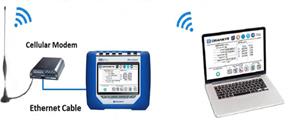
The cellular modem bridges the Dranetz HDPQ instrument to the Internet, making it available for VNC remote control, the Dranetz HDPQ App and data downloading from any Internet connected computer. 

Most 3G and 4G cellular modems connect to the Dranetz HDPQ by using Ethernet communications, although some newer models can connect to the instrument using a Wi-Fi connection (model dependent). Regardless, they work very much the same. An example using Ethernet is shown in Figure #1. The Ethernet link from the cellular modem to the instrument can be a direct connection (as shown), or through a local Ethernet router or switch.  


 Figure 1. Typical Wireless Modem Application
 

For all remote communications, including cellular wireless, the Dranetz HDPQ instrument must be assigned an IP address that’s addressable from the remote network that the computer, tablet, or Smartphone is connected to. In other words, if you want to use the Internet, both the Dranetz HDPQ and the remote computing device being used to communicate with the instrument must be properly connected to the Internet. The same is true for any network - public or private. In this application, the cellular modem connects to the Internet and assigns an IP address to the instrument. The VNC viewer or other remote application communicates with the cellular modem which acts as a go-between and ‘forwards’ information between the Internet and instrument. 

There are two types of IP addresses – Dynamic (DHCP) and Static. Dynamic IP addresses are usually automatically assigned by the networking hardware. Dynamic IP addresses can change regularly, so the IP address assigned today can be different tomorrow. Static IP addresses are pre-assigned by the network administrators and don’t change. It’s for this reason that it’s highly desirable to obtain a Static IP address for your cellular modem from your wireless carrier - the cellular modem is what’s connected to the Internet and it’s much better for it to be fixed and not changed automatically. 

DRANETZ HDPQ INSTRUMENT SETUP 
When using a cellular modem, the communications setup of the Dranetz HDPQ instrument is very straightforward and is the same as when used on most networks.

Step #1 – Select ‘Setup Communications Options” from the Setup menu. 


Step #2 - Select the Ethernet tab (bottom left) and select “Yes” for DHCP. Dynamic Host Configuration Protocol (DHCP) is a network protocol that enables a server to automatically assign an IP address to a device. In this case the cellular modem is providing the Dynamic IP address to the instrument. A static IP address can also be used, but the cellular modem must be configured for this option. 


Step #3 – Select the “VNC” tab and make sure that VNC communications are enabled and “VNC Enabled = Yes”. 


CELLULAR MODEM SETUP 
The setup of the cellular modem is manufacturer and model dependent and there are too many variations to describe here. As mentioned above, regardless of where you purchase your cellular modem, you will have to work with a cellular carrier and obtain a data plan/contract. It’s also recommended that you ask that a Static IP address is assigned to your cellular modem so the IP address doesn’t change. 

COMMUNICATING WITH A REMOTE DRANETZ HDPQ 
A VNC viewer is needed on your computer, tablet or Smartphone to remotely control the Dranetz HDPQ. These are readily available for download on the Internet and most will work well. ‘Real VNC’ is commonly used for PC applications and there are also versions available on the Apple and Android stores for tablets and Smartphones. Once you’ve installed the VNC viewer, you can easily communicate with the Dranetz HDPQ by entering the IP address of the cellular modem. 


If everything is working, you will be prompted for a password, which is "Dranetz" by default.

TO CONTACT DRANETZ 
Call 1-800-372-6832 (US and Canada) or 1-732-287-3680 for Technical or Sales support. 
To submit a support request online, please visit: 
http://www.dranetz.com/contact-us-2/technical-support-request/


Thursday, May 30, 2013

Dranetz App Note: Corrugated and Cardboard Packaging

We’ll bet you don’t spend a lot of time thinking about corrugated and cardboard packaging, do you?

But take a close look and you’ll see that it’s all around us.  According to the New York Department of Environmental  Conservation (NYDEC), 90% of all products shipped in the United States are shipped in corrugated and cardboard boxes. That’s a lot of boxes, trees, pulp, power, and energy.  And that’s where Dranetz comes in.

Recently, Dranetz was asked by a large corrugated packaging manufacturer with multiple manufacturing sites on the East Coast and central parts of the United States to assist with assessment of planned expansions as well as ongoing energy management, and provide proactive power quality analysis. Using both the PowerVisa power quality demand & energy analyzer and a permanently installed Encore Series power monitoring system, the electrical design team was provided with crucial information on a host of issues, including energy usage and PQ problems originating all the way back to the electric utility itself.

The initial results were so successful, that over the next year an Encore system has been budgeted for every one of their plants. To find out more, click on the link below to download the complete Dranetz application note.
Corrugated and Cardboard Manufacturing Application Note

To find more information and application notes about power quality and energy management, please visit us at www.dranetz.com.